Selling in your DMs? Send a payment link.
Create a payment link or a branded invoice in a few taps and share it however you talk to your customer. They pay online, you're notified, and the money goes into your Khaime wallet.
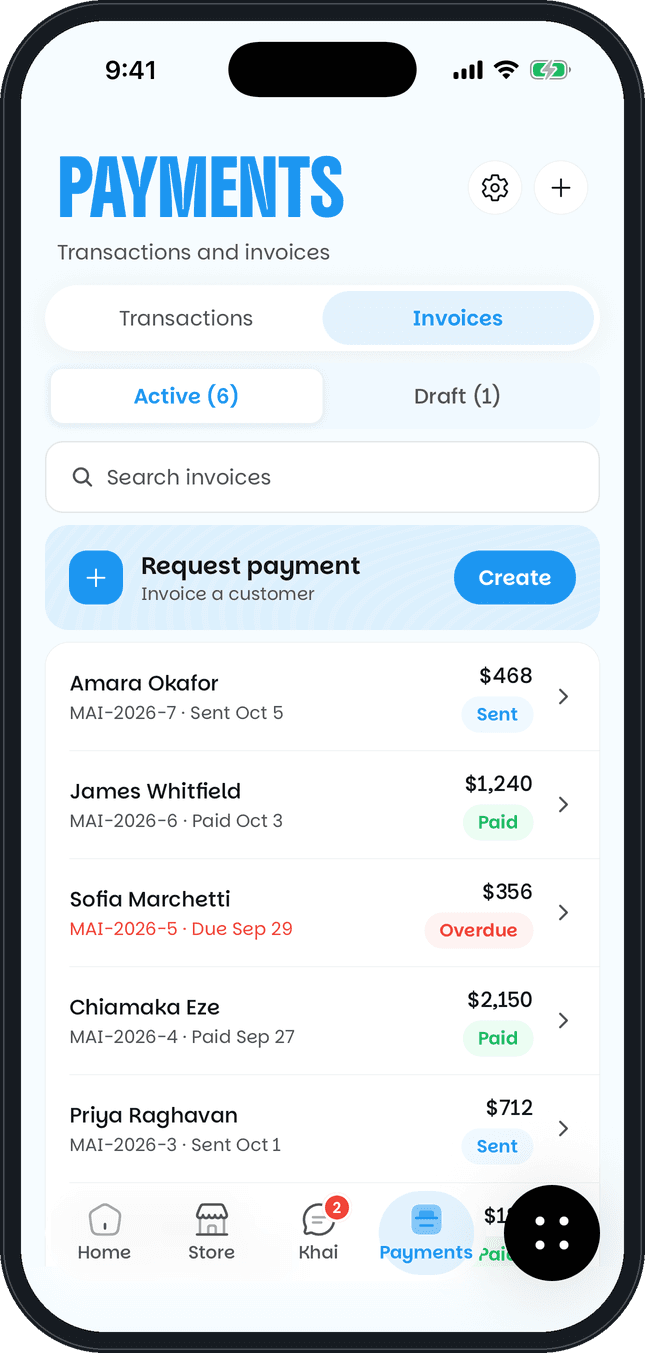
What you can do
Payment links
Make a link for any amount and share it on WhatsApp, Instagram or by email.
Branded invoices
Pick a template, add your logo and line items, and send it from the web or the app.
Your own tax rates
Add the tax rates you charge to invoice lines.
See who has paid
Every invoice shows as draft, sent, paid or overdue, so you know who still owes you.
Send a reminder
Send a payment reminder from the invoice whenever you choose.
Paid into your wallet
Invoice payments go into the same wallet as your store sales.
How it works
- 1Create a payment link or an invoice.
- 2Share it on WhatsApp, Instagram or by email.
- 3Your customer opens it and pays online.
- 4You're notified, and the money goes into your wallet.
Questions
Can't find your answer? Email support@khaime.ai and we'll help.
No. They open the link or invoice and pay online.
Yes. You can send a reminder from an unpaid invoice whenever you choose.
Yes. You can add your own tax rates to invoice lines.
No. Payment links and invoices work on their own, and they also work alongside your store.
Start selling
to the world today.
Set up your store in minutes. Buyers anywhere pay in their own currency, and you get exactly the price you set.